How Membase works
How documents become memory, how search behaves, and how models and access settings affect API calls.
This page describes the behavior an integration needs to handle: learning from documents, searching memory, choosing a model and checking access.
Accounts and Memories
Section titled “Accounts and Memories”Each account owns its Memories, sources and access settings. No API request names a Memory:
a credential reads every Memory the owner let it reach, and writes land in the one text Memory
it reaches. Answers name the Memory they came from (memory_name). Use the account owner’s
credentials; do not use Memories as isolation boundaries between different users.
Multi-user isolation.
Material becomes memory in a learning turn
Section titled “Material becomes memory in a learning turn”A Memory has an instruction describing what to retain and sources containing material to process. Adding or syncing a source does not mean the Memory has learned its contents.
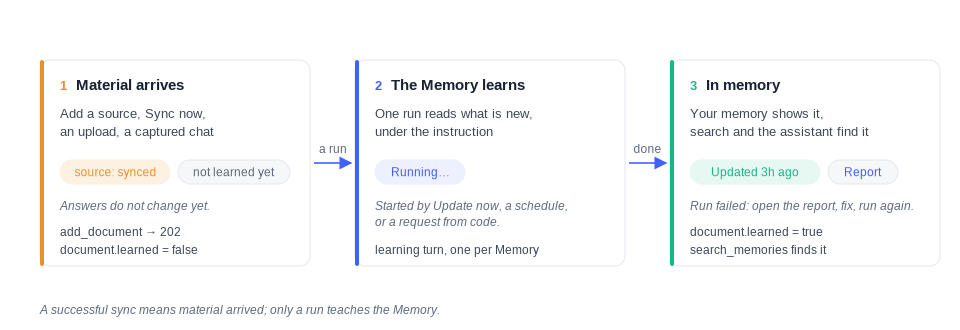
Select Update now in the app or configure a schedule to process sources. The API’s
add_document also requests learning and returns 202; this acknowledges acceptance, not
completed learning. Wait until the document’s learning status reads succeeded before
searching for the new content.
If processing fails, resolve the reported issue and update the Memory again.
Memory operations.
A search is a turn
Section titled “A search is a turn”search_memories retrieves relevant passages from every Memory the credential reaches. Each
result names its Memory (memory_name). ask_memory returns one answer the memory engine
writes from the Memories in reach, with no agent and no tools; today only a marketplace
buyer’s credential holds it.
- Allow time for startup and retrieval. A request after inactivity can take longer. The SDKs default to a 90-second timeout; some requests may need longer.
- Check partial failures. An HTTP
200can still name Memories inpartial. Do not report an empty search as “nothing found” until you have checked them. - Check what the limit left out. A Memory in
partialwithreason: "truncated"had passages that did not fitlimit; its silence is about the budget, not about what it knows. Raiselimitto hear it. - Use the supported search fields. Search accepts
q, alimitand amode(fullorfast). Metadata filters are not supported, and an unknown field is refused; include relevant constraints in the query.
See API troubleshooting for timeouts and unavailable Memories.
The profile
Section titled “The profile”The profile holds standing statements about the user (pf_…: name, role, lasting
preferences) separately from topic-specific Memories. Each says where it came from
(source_kind: user_stated, imported or model_generated). List it with
list_profile_facts when the credential grants profile access; a key whose level allows
writes may also keep a statement (add_profile_fact) and, at Full access, forget one
(forget_profile_fact, with confirm=true). There is no editing: a correction is a new
statement and the old one forgotten.
Models
Section titled “Models”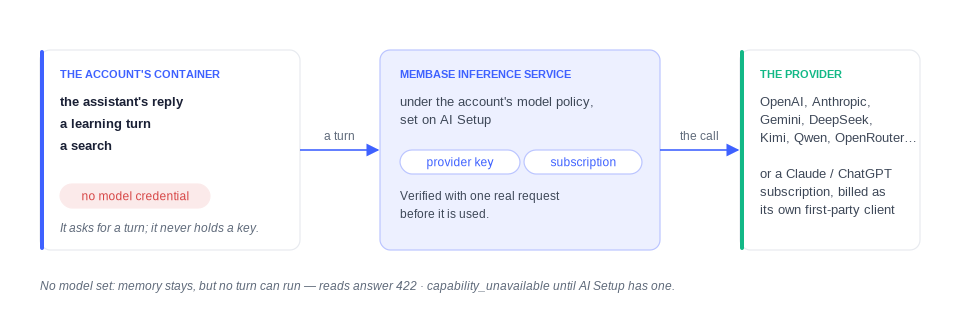
Learning, hosted search and assistant replies require an available model. The account owner configures supported providers or subscriptions in AI Setup and selects the assistant’s model source in its settings.
When a model is unavailable, stored memory remains, but learning or search may fail. A turn
can return 422 with code: capability_unavailable; search may instead name each affected
Memory in partial with reason: "error". A document can remain unread until the issue
is resolved and learning completes. A free-plan account whose free allowance is used gets the
same 422 · capability_unavailable, with details.reason: "dormant". Follow the returned
recovery guidance.
Access and confirmation
Section titled “Access and confirmation”Developer keys have an access level, selected Memories and an expiry. MCP consent grants read access to the Memories the owner approves. Profile access is a separate setting. Changes to permissions apply to subsequent requests using the credential.
forget_memory, delete_document, delete_media and forget_profile_fact require Full
access and confirm=true; without it nothing changes and the answer is
428 confirmation_required. Obtain the owner’s confirmation before submitting one. Revoking a credential prevents
future access through it; it does not erase results already received by an external client.
Authentication describes the permission rules.
Where to go next
Section titled “Where to go next”| Task | Guide |
|---|---|
| Make a first call | Quickstart |
| Add, retrieve or remove content | Memory operations |
| Look up an operation | API reference |
| Map the app to API concepts | Platform overview |
| Connect an AI app | Connect your AI |
| Review engine evaluation results | Benchmarks |