Authentication & Scopes
Every call carries a bearer. What the credentials are, what an access level grants, what reach and the profile tick add, and how a key ends.
Every request to https://api.app.membase.com carries one header:
Authorization: Bearer <credential>There is no API-wide key, no client secret and no signature. The credential itself says who the caller is, which Memories it may touch, and what it may do to them. Both kinds of credential are minted by the account’s owner and can be narrowed or revoked by them at any time; the change applies on the credential’s next call.
The credentials
Section titled “The credentials”| Developer key | Consent token | |
|---|---|---|
| Minted by | the owner, under Connect › Developer keys | the owner, approving an app on the OAuth consent screen |
| Held by | code the owner runs: a script, a server, an SDK, an AI running the skill | an AI app: Claude, ChatGPT, Cursor, Codex, Grok, Kimi… |
| Shape | mbk_<key id>_<token>, shown once; the key’s page keeps a hint such as mbk_7f3a92d1…c91e |
opaque; the app stores it |
| Access | Read, Read & write or Full access, chosen at creation; it can be lowered in place, but a Read key cannot be raised to write (create a new key) | read-only, always |
| Reach | the Memories ticked on the key, or all, including later ones | the Memories ticked on consent |
| Profile | when Your profile is ticked: read at Read, keep a statement at Read & write, forget one at Full access | read only, when Profile access is ticked at consent; to change it, disconnect and authorize again |
| Can confirm a removal | yes, with confirm=true |
never |
| Expires | never, 30 days, 90 days or a year | at the end of the token’s lifetime; there is no refresh, the app authorizes again and the owner re-approves |
Which one you need: if your code holds the credential, a developer key. If the user’s AI app holds it, consent through MCP, and your code never sees a token at all. The Connect your AI tab is the consent path; the rest of this page is mostly about keys.
A third credential exists but is not minted by the owner: buying a Memory on the Marketplace
gives the buyer one. It reaches that one Memory and holds only ask_memory: answers, never the
passages, documents, facts or the seller’s profile, and never a write. Every call re-checks the
purchase and takes one call of the period’s allowance.
Access levels
Section titled “Access levels”A level is a set of operations. Each level adds to the one before it.
| Level | Grant | Operations |
|---|---|---|
| Read | read |
search_memories, list_memories, get_memory, list_documents, get_document, list_media, get_media, search_media; list_profile_facts with the profile tick |
| Read & write | suggest |
Read, plus add_memory, add_document; add_profile_fact with the profile tick |
| Full access | manage |
Read & write, plus forget_memory, delete_document, delete_media, and forget_profile_fact with the profile tick, each only with confirm=true |
GET /v1/capabilities names the actions a credential holds (actions), the Memories it
reaches (memories) and the standing rules for using them (rules). It is not permission:
every call is still checked when made.
ask_memory is on no developer key, at any level: today only a marketplace buyer’s credential
holds it, and from a key the call is refused with 403 like any verb outside its grant. The
profile tools and ask_memory are explicit: a credential holds them only when its tool list
names them, never from its level alone. The API reference
lists each level’s ceiling from the tool table itself, which is why ask_memory appears under
Read there; a key never reaches it.
A call above the key’s level is refused with 403 and code: unauthorized, and the key’s
page counts it as a refused call. Lowering
the level on the key’s page applies on the key’s next call, with the same token. Raising it
does not give a Read key the right to write: its token was minted read-only, so its
writes keep failing with token missing required scope. To write, create a new key at
Read & write or Full access.
Reach is the list of Memories a credential may use. It is switched on the Connect page, on the key’s page under Memory access, or on a Memory’s own page under Use in; all three are the same switch. A key created with All memories, including ones you make later reaches every Memory the account has now or later.
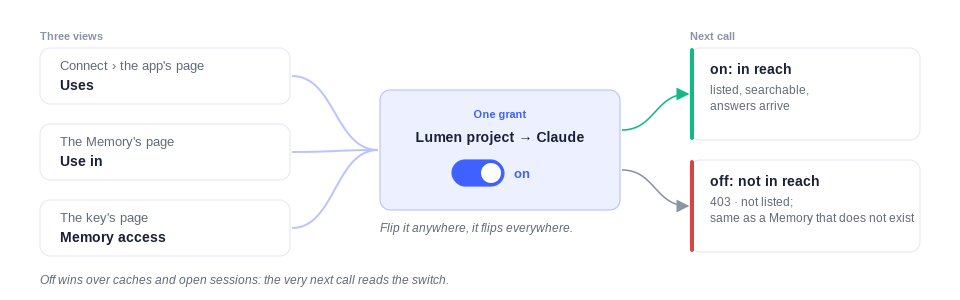
No request names a Memory. Searches and lists cover every Memory in reach and leave the
others out; an id from a Memory outside the reach reads exactly like one that does not exist:
404 · not_found. GET /v1/capabilities (over MCP, get_capabilities) never names a
Memory outside the reach, so a client cannot tell withheld from absent.
Writes land in the key’s write target: the one text Memory it reaches. A key that reaches
several text Memories is refused on add_memory and add_document with
422 write_target_required, and nothing is written somewhere by guess. To write, mint the key
for the Memory its writes should go to.
The profile tick
Section titled “The profile tick”The profile is a list of standing statements about the person (pf_…): their name, role,
lasting preferences. It is the account’s, not part of any Memory, so reach does not cover it.
A credential reaches it only when the owner ticked Your profile on the key or Profile
access on consent; without the tick no profile operation is offered at all.
What the tick grants follows the key’s level:
| Level | With the profile tick |
|---|---|
| Read | list_profile_facts |
| Read & write | also add_profile_fact |
| Full access | also forget_profile_fact, with confirm=true |
A consent token with the tick holds list_profile_facts only. A key minted before the profile
became a list of facts holds the read only, under its retired name get_profile, until the
owner changes the key. On a consent connection the tick is set only at consent; to change it,
the owner disconnects the app and authorizes it again.
Destructive operations
Section titled “Destructive operations”forget_memory, delete_document, delete_media and forget_profile_fact need Full access,
and even then they do not run on their own: a call without confirm=true changes nothing and answers
428 confirmation_required, naming the target by its public id:
{ "error": { "code": "confirmation_required", "message": "Pass confirm=true to forget this memory.", "details": { "id": "mem_…", "verb": "forget_memory", "content": "…", "how": "…" }, "retryable": false, "trace_id": "…" } }The how sentence is what to relay to the person. Pass confirm=true only after they
agreed; from a developer key that counts as the owner’s confirmation. A consent token is
never offered these verbs at all and is read-scoped, so from an AI app the call is refused
with unauthorized · token missing required scope, not answered with the sentence. A
Read & write key gets 403 · unauthorized · tool 'delete_document' is not in this agent's capability profile.
Expiry, rotation, revocation
Section titled “Expiry, rotation, revocation”- Expiry is chosen at creation (never, 30 days, 90 days or a year in the app; any 1–3650 days through the API) and cannot be extended on an existing key; rotate instead. An expired key answers
403withcode: unauthorized, and its row moves to Expired. - Rotate… pre-fills a new key with the old key’s level, reach, profile tick and the same expiry duration counted from now, and asks what to do with the old one. By default the old one keeps working until you revoke it, so you can swap the value in your environment first. From the API you pass those fields yourself;
replaces: <old id>only records the lineage. - Revoke… ends a key at once. Every holder of the token fails on its next call. The key stays listed under Revoked for thirty days so you can see what it was.
- Disconnect… on an app’s page revokes every consent token that app holds. Removing the connector inside the app does not tell Membase; revoke on Connect to be sure.
Revocation and permission changes apply to subsequent requests. They do not remove content already received or stored by an external client.
What a wrong credential looks like
Section titled “What a wrong credential looks like”| Answer | Meaning |
|---|---|
401 |
no bearer at all (REST; the MCP endpoint differs, below) |
403 · unauthorized |
an unknown, expired or revoked token, or a verb above the level. The message says which. |
403 · unauthorized · token missing required scope |
a write verb (add_memory, add_document, delete_document, forget_memory) from a Read key or a consent token |
403 · unauthorized · not in this agent's capability profile |
a verb the token may call but the level does not grant: delete_document or forget_memory from a Read & write key, list_profile_facts without the profile tick |
404 · not_found |
an id outside the reach, deleted, of the wrong type or not one of ours: all answer alike |
On the REST endpoints the status is 403 and not 401 for a bad token on purpose: the
request was authenticated as some caller (the key id is in the token) and that caller is
not allowed. Only a request with no bearer is 401.
The MCP endpoint (/mcp-http) follows the OAuth convention instead and answers 401 in
both cases, with a flat body rather than the {"error": {"code", …}} envelope:
- No bearer:
WWW-Authenticate: Bearer resource_metadata="https://api.app.membase.com/.well-known/oauth-protected-resource/mcp-http"and{"error": "unauthorized", "error_description": "…"}. - An invalid, expired or revoked bearer:
WWW-Authenticate: Bearer error="invalid_token", resource_metadata="…"and the RFC 6750 body{"error": "invalid_token", "error_description": "…"}.
Managing keys from code
Section titled “Managing keys from code”Keys are managed with the owner’s own session, the credential the Membase app holds after sign-in, and never with a developer key: a key cannot mint, widen or revoke another key. The screen for the same operations is Connect › Developer keys.
| Call | Does |
|---|---|
POST /v1/keys/create |
mint a key: name, profile (read, suggest or manage for Read, Read & write, Full access), view_ids (its Memories) or all_views: true, profile_access, expires_in_days (1–3650; omit for never), replaces (the key it rotates out) |
POST /v1/keys/{id}/update |
change name, profile, profile_access or all_views; the next call reads the new grant, except that raising a Read key’s profile does not let it write (create a new key) |
POST /v1/access/{id}/memories/set |
change its Memory list |
GET /v1/keys/{id}/usage |
calls per day, refusals, per tool, the last twenty |
POST /v1/access/{id}/revoke |
revoke it, at once |
OAuth, for an app that connects over MCP
Section titled “OAuth, for an app that connects over MCP”The MCP server at https://api.app.membase.com/mcp-http advertises its authorization the
standard way, so any MCP client that speaks OAuth connects without a Membase-specific step:
- An unauthenticated request answers
401with aWWW-Authenticatepointing at the protected-resource metadata (/.well-known/oauth-protected-resource/mcp-http, RFC 9728). - The protected-resource metadata names the authorization server; the authorization-server metadata (
/.well-known/oauth-authorization-server, RFC 8414) names the registration endpoint (/oauth/register). The client registers itself dynamically (RFC 7591) and starts the authorization code flow with PKCE (S256). - The browser opens Membase’s consent screen. The owner ticks the Memories the app may use and Profile access if it may read their profile, and approves.
- The client receives a token good for exactly that.
tools/liston that token offersget_capabilities,search_memories,list_memories,get_memory,list_media,get_media,search_mediaand, when ticked,list_profile_facts: nothing that writes. The token is not refreshed (grant_types_supportedisauthorization_codeonly): when its lifetime ends the app authorizes again and the owner re-approves.
A client that cannot do OAuth sends a developer key in the same Authorization header
instead, and gets the key’s level.
Keep the token out of the open
Section titled “Keep the token out of the open”- Read the key from the environment (
MEMBASE_API_KEY), never from source. - Log the hint from the key’s page, never the token.
- Do not put a key in a config file you commit or publish; the ready-made client configs Membase serves carry no header for that reason.
- One key per thing that holds it, named after it, so a revocation stops one thing.